
Coaching without the digging: Question-level scoring across reviews
You can now see how every scorecard question was scored across a review period, so you can spot knowledge gaps

We’ve added presets to our Home, Frequent Customers, and Coach screens. Just like in our Explore screen , you will now be able to save your preferred set-up for dates and filters to immediately spot data that is useful to you as soon as you log-in, and switch between different data sets with ease.
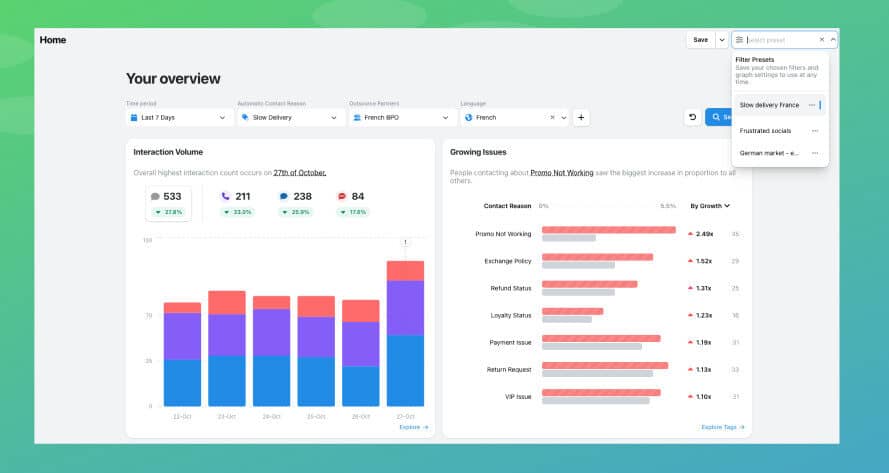
If you create and apply a preset on one screen, for example Explore, it will be applied across the platform. Each one you create is unique to your user account, so you can create as many as you’d like. You can share them by sharing a link to your page once the preset is applied.
Once you have, you’ll be able to use these to quickly assess what’s happening across your organisation. They are useful for quick views of areas you know are prone to issues, or you’re concerned about in a specific period of time.
With Presets now across WatchTower, you can spend even less time setting up filters and more time acting on insights. This feature is available to all WatchTower users.
You can now see how every scorecard question was scored across a review period, so you can spot knowledge gaps
Every agent who touches a conversation gets tracked against it now, and you can widen filtering and reporting to match,
You're now able to drop reusable variables into an Ask Spotlight prompt, so you don't have to retype the same


Robert Davies
Consultant
"You’ve got an issue, but you don’t know how many people are affected. You don’t know the scale. You don’t even know if it’s real."


Quentin Bottner
Head of Continuous Improvement
"We’re a big business, so getting the right people to agree and fix something hasn’t always been easy. Now we’ve got one version of the truth—it’s much easier to align and act"


Vladimir Greavu
BBG Director of Customer Service
"I specifically liked the flexibility. I liked the can-do attitude. I always felt supported. There hasn’t been any single point in our journey where EdgeTier has said no."



Let us help your company go from reactive to proactive customer support.
Unlock AI Insights